Google Ads specialist
Google Ads management for service businesses

I manage Google Ads for service businesses that need more than clicks and form submissions. The goal is to generate leads that turn into qualified opportunities, booked jobs, customers, and revenue.
Most of my clients are in the U.S., although I also work with businesses in other English-speaking markets. I handle every account personally, including strategy, optimization, tracking, reporting, and communication. No outsourcing.
My Google Ads management services are generally a good fit for businesses spending at least $3,000 per month on ads.
Who I work with
Moving companies are one of my main specialties, and I’ve written a detailed Google Ads guide for movers. I also work with other local and home service businesses, professional services, B2B companies, and SaaS businesses.
The common denominator is lead generation. Google Ads needs to produce inquiries, calls, booked jobs, qualified opportunities, or another measurable business outcome.
I don’t manage Google Ads for e-commerce businesses.
I prefer taking over accounts that already have some history because there is usually more data to work with. But I also build and launch new Google Ads accounts from scratch when it makes sense.
What my Google Ads management includes
Google Ads management is not just changing bids or adding a few negative keywords every month. I look at the account as a complete system: traffic, campaign structure, tracking, lead quality, and what happens after the conversion.
- Campaign structure and restructuring
- Keyword strategy and match types
- Search terms analysis and negative keywords
- Bidding strategies and targets
- Budget allocation and pacing
- Ad copy and assets
- Geographic targeting
- Campaign experiments and testing
- Landing page recommendations and, when needed, landing page development
- Conversion tracking
- Offline conversion tracking
- CRM and post-conversion data
- Detailed reporting
- Regular communication and performance reviews
The exact setup depends on the business. I don’t force every client into the same campaign structure, bidding strategy, or reporting template.
I optimize for qualified leads, booked jobs, and revenue
A low cost per conversion does not necessarily mean Google Ads is working well. A campaign can generate cheap form submissions while bringing in poor leads that never book, never qualify, or never generate revenue.
For local businesses, I often use WhatConverts together with the client’s CRM. This lets me connect calls and form submissions back to the advertising data and see which campaigns, keywords, and Search terms are actually producing qualified leads and customers.
For other businesses, I build the tracking around whatever matters most to them. The implementation can be different, but the principle is the same: move optimization closer to the actual business outcome instead of treating every Google Ads conversion as equally valuable.
Depending on the project, the main KPI may be qualified leads, booked jobs, revenue, or ROAS.
How I manage your Google Ads account
Every day, I check that campaigns are running normally and look for obvious problems, sudden drops, or delivery issues. If something serious comes up, I either fix it within 24 hours or update the client if their input is needed.
Every one to two weeks, I do a deeper account review and optimization. This is where I look at Search terms, negative keywords, budgets, bidding, campaign structure, ads, landing pages, and other areas that may need attention.
I also try to run at least one meaningful experiment or test every month. Depending on the account, that might mean testing a different bidding strategy, keyword match type, ad copy, landing page, or campaign structure.
Client communication depends on preference. Calls, email, and messaging are all possible. Most clients hear from me between one and four times per month.
Reporting that goes beyond Google Ads conversions
My clients get access to custom reporting software that is available 24/7 and updated daily.
The exact reporting setup depends on what data is available, but the goal is to show the full picture, not just clicks and Google Ads conversions.
- Clicks
- Leads
- Qualified leads / booked jobs
- Revenue
- Ad spend
- ROAS
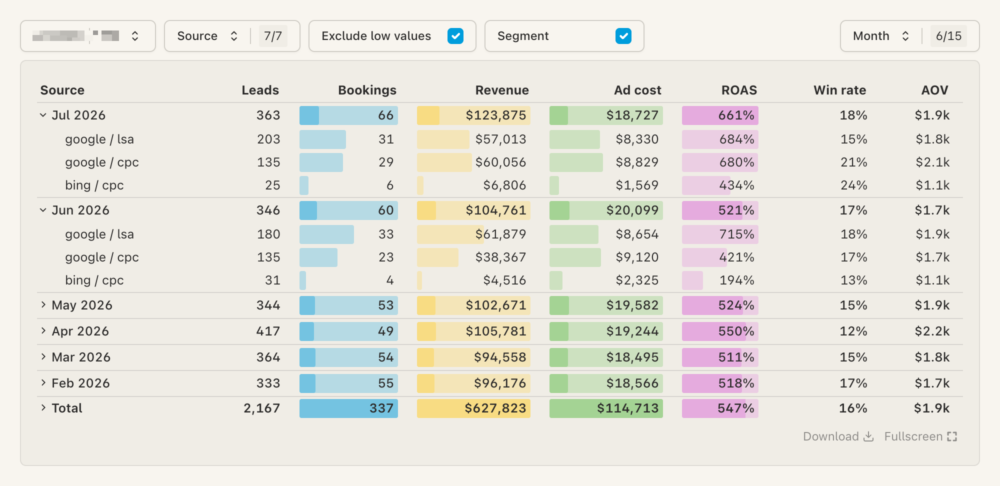
For local service businesses, I often combine advertising data with WhatConverts and CRM data. This makes it possible to see not only which campaigns generate leads, but which leads actually qualify, book, and generate revenue.
Landing pages when they can improve performance
Sometimes the Google Ads account is not the main problem. If I believe the landing page is limiting results, I can build a dedicated landing page in WordPress as part of my Google Ads management service.
I don’t create a new landing page just because it is something agencies are expected to offer. I do it when I believe it can materially improve campaign performance.
Results from accounts I manage
I prefer showing what happens after the lead, not just the conversion numbers reported inside Google Ads.
Pool cleaning company – San Diego, CA

95 leads → 27 qualified leads → $136.3K in estimated revenue
Moving company – Boston, MA

115 leads → 31 booked jobs → $39.2K in estimated revenue
The principle is always the same. I don’t want to stop at “Google Ads generated 100 conversions.” I want to know how many of those leads were qualified, how many became booked jobs or customers, and how much revenue the advertising generated.
Search first approach
Search campaigns are the core of how I approach Google Ads for lead generation. They give me much better visibility into what people are searching for, how different types of traffic perform, and where the budget is going.
I use Performance Max selectively. It can work, but I don’t treat it as the default solution. In accounts I’ve managed, Performance Max can bring in traffic that looks good at the conversion level but turns out to be low quality. It can also pick up branded demand that would otherwise be handled much more transparently through a dedicated branded Search campaign.
What happens when I take over an account
Most of the accounts I work with are already running when I get access. I start by reviewing the existing campaigns, conversion tracking, search terms, bidding, budgets, targeting, ads, landing pages, and the data Google is currently optimizing toward.
- Fix conversion tracking and measurement if needed
- Clean up or restructure the existing campaigns
- Correct obvious budget, bidding, targeting, or Search term issues
- Establish a reliable reporting setup
- Launch or relaunch campaigns with a cleaner baseline
I don’t rebuild an account just for the sake of rebuilding it. If part of the existing setup works well, I keep it.
New accounts follow a similar process, except the campaign structure, tracking, keywords, ads, and reporting are built from scratch before launch.
Google Ads management pricing
Google Ads management starts at $700 per month.
I generally recommend a minimum Google Ads budget of around $3,000 per month. Below that level, there is often not enough traffic or data to justify ongoing professional management.
The exact price depends on the size and complexity of the account and the amount of work involved. Tracking, reporting, ongoing optimization, and landing page work when I believe it is needed are all part of how I manage the account.
Your account and everything built in it belong to you
The Google Ads account stays under the client’s ownership.
There is no long-term commitment. Management is paid one month at a time, and you can cancel at any time. If you don’t cancel, management simply continues for the following month.
Frequently asked questions
How much does Google Ads management cost?
Management starts at $700 per month. The exact price depends on the size and complexity of the account and the amount of work involved.
What Google Ads budget do I need?
I generally recommend at least $3,000 per month in Google Ads spend for ongoing management. With significantly smaller budgets, there is often not enough traffic or conversion data to justify the cost of professional ongoing management.
Do you work with new Google Ads accounts?
Yes. I prefer accounts that already have some history because there is more data to work with, but I also build and launch new Google Ads accounts from scratch.
Do you work with e-commerce businesses?
No. My focus is lead generation for moving companies, local and home service businesses, professional services, B2B companies, and SaaS businesses.
Do you build landing pages?
Yes, when I believe a dedicated landing page can improve campaign results. I build landing pages in WordPress, and this can be included as part of my Google Ads management service.
Do you manage Performance Max campaigns?
Yes, but selectively. For lead generation, Search campaigns are usually the foundation of my strategy. I use Performance Max when there is a clear reason to use it and when the available data make it possible to evaluate lead quality, not just reported conversions.
Do you provide conversion tracking?
Yes. Conversion tracking and measurement are part of how I manage Google Ads. Depending on the project, this can include Google Ads conversion tracking, Google Tag Manager, CRM data, WhatConverts, offline conversions, and custom reporting.
How often do you work on the account?
I check every account daily for major issues or unusual drops. Deeper reviews and optimizations normally happen every one to two weeks, and I try to test at least one meaningful new idea or experiment each month.
How often will we communicate?
Usually between one and four times per month. Calls, email, and messaging are all possible. I adapt communication to what is most convenient for the client.
Is there a long-term contract?
No. You pay for one month of management at a time and can cancel at any time.
Who will actually manage my Google Ads account?
I will. I personally handle strategy, optimization, tracking, reporting, and communication. I don’t outsource account management.
Book a call to see if there is a mutual fit
On the call, I’ll request access to take a closer look at your Google Ads account. If there’s room for improvement, I’ll walk you through what could be optimized. If the setup is already strong, I’ll let you know.
This review is free and there’s no obligation. If it feels like a good fit, great. If not, no hard feelings.